Introducing the Nen Computer Use Desktops — Cloud Windows Desktops for Computer Use Agents
Most teams building computer use agents already own the agent loop and call out to a sandbox for execution. OpenAI made that pattern official this week with native sandbox support in the Agents SDK. Every sandbox provider on the launch list runs Linux. If parts of your workflows run on Windows desktops, the ecosystem is just starting to catch up.
Windows is where work happens
AI agents today combine API calls, browser automation, and desktop computer use to complete real workflows. For many of the most valuable use cases, computer use on a full desktop environment is a critical piece. The workflow crosses multiple applications, involves thick-client software that only runs natively, or requires maintaining session state across steps.
Windows holds 72% of the global desktop OS market, and that share is even higher in the industries where agents have the most to do. Healthcare runs on Epic, NextGen, and eClinicalWorks. Supply chain runs on SAP, Oracle WMS, and Blue Yonder. Pharma QC labs run Empower, Chromeleon, and OpenLab. These are complex, stateful workflows across applications that were built for human operators sitting at a desktop. However, that's not the world we need to live in anymore.
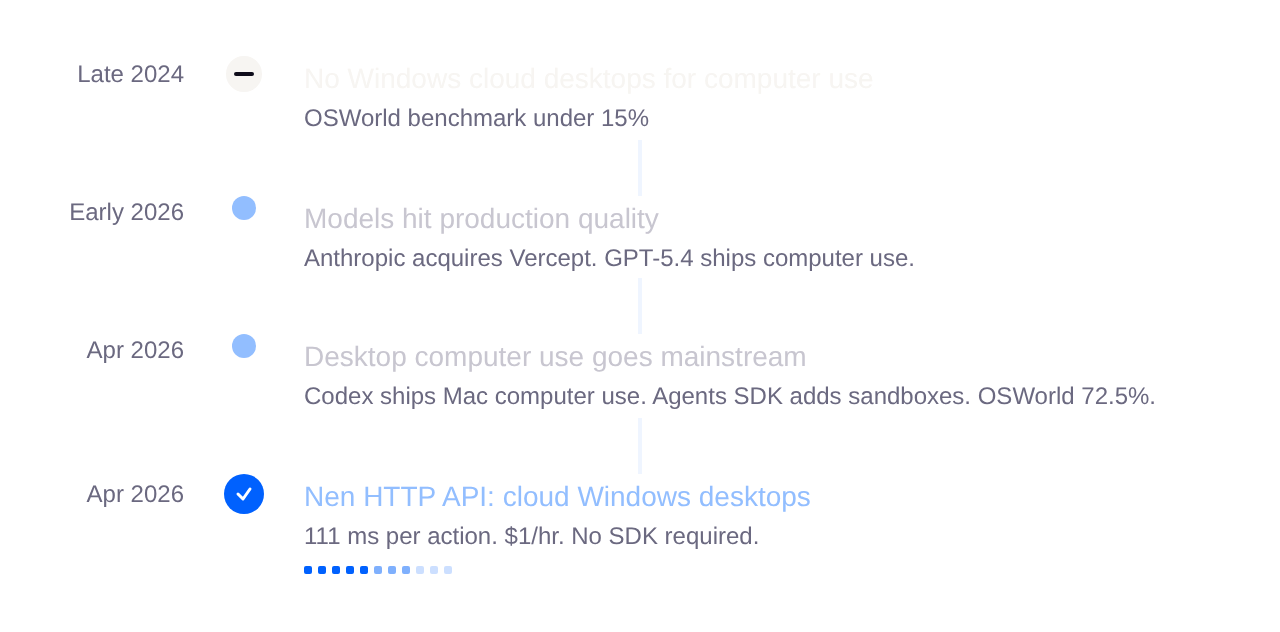
Computer use models hit production quality in early 2026. The infrastructure for running them on Windows has not kept up. The difference between building for Windows and bolting it onto an existing platform shows up in the implementation details. Other providers have added Windows through VNC on QEMU, private alpha programs, or architectures that only run Linux kernels. None of them use RDP natively, none run Windows Server, and none publish per-tenant network isolation or credential security for regulated workloads.
That is why Nen exists.
Built for the agent loop
Nen is optimized for three things.
Per-action latency below 200 ms
A computer use agent runs a loop: observe the screen, send it to a model, execute the action, observe the result. That cycle repeats 20 to 50 times per task. Latency on each cycle compounds directly into total task time.
Nen uses RDP natively for all input injection and screen capture. Windows ships RDP at the display driver level, which means screen changes are captured before they reach the framebuffer. Other computer use sandboxes use VNC for screen capture, which reads the framebuffer after rendering. That readback carries an inherent latency cost on any screen updates.
Capture speed is only half the problem. The other half is how many round trips it takes to complete a single step. Nen also bundles a post-action screenshot into every execute response. One HTTP call completes the full observe-act-observe cycle. Every other provider requires a separate screenshot call after each action, doubling (or worse) the round trips per step. One provider's SDK executes each action as a shell command spawned via xdotool, requiring five HTTP calls for a single cycle.
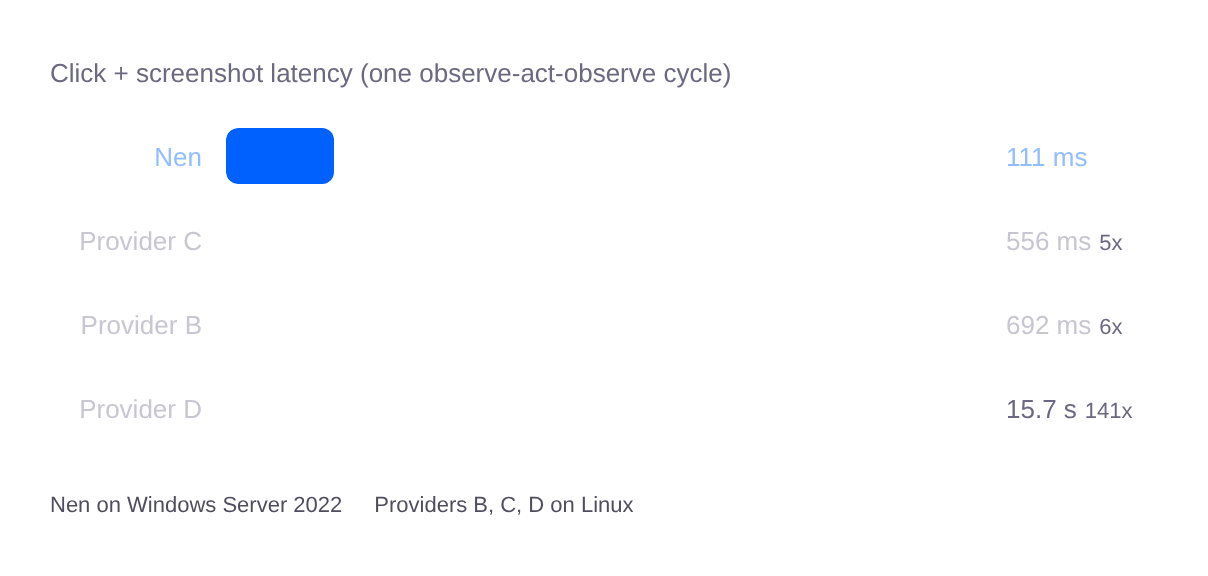
Over a 30-step task, Nen accumulates 3.3 seconds of action overhead. Provider D accumulates over 7 minutes. The full benchmark table with type latency, throughput, and cold start is below.
Time to first action
Windows Server boot time is substantial and cannot be optimized away at the OS level. Nen removes the boot from the critical path. A dedicated pipeline maintains a pool of Windows Server 2022 instances that are already running before any request arrives. Driver initialization, service startup, and display compositor readiness all complete in the background continuously. When a developer calls the create endpoint, the provisioner claims a desktop that is already booted. Cold start is 6.4 seconds end to end, measured from the API call to the first successful screenshot return.
Nen desktops freeze when idle and restore on demand with full state intact — filesystem, running processes, open windows, and authenticated sessions exactly as the agent left them. You only pay while the desktop is active, and state survives across arbitrary gaps between sessions. This matters for long-running automation workflows, iterative prompt development, and persistent agent sessions where the developer needs the desktop to be in the same state when they come back to it.
Full agent loop in seven lines
Nen abstracts away a Windows computer. There is no vendor SDK to install or update. There is no Windows machine to provision, no display server to run, no screenshot pipeline to build and maintain. You write the agent logic. Nen runs the Windows desktop underneath and keeps it working.
The API design also eliminates the per-step round trips that add up in production. Most sandboxes split the observe-act-observe cycle into separate calls: execute the action, then request a screenshot. Nen bundles the screenshot into the execute response, so one HTTP call completes a full agent step. Over a 30-step task, that is 30 calls your code has to manage instead of 60 to 100. The agent loop stays simple.
import httpx, base64

headers = {"Authorization": "Bearer sk_nen_..."}
r = httpx.post("https://desktop.api.getnen.ai/desktops", headers=headers)
desktop_id = r.json()["desktop_id"]
r = httpx.post(
    f"https://desktop.api.getnen.ai/desktops/{desktop_id}/execute",
    json={"action": {"tool": "computer", "action": "screenshot", "params": {}}},
    headers=headers,
)
open("shot.png", "wb").write(base64.b64decode(r.json()["base64_image"]))
Seven lines, no vendor SDK, and the developer has a Windows desktop under programmatic control.
Benchmark results
Computer use has a reputation for being slow. The numbers below are why we think Nen changes that.
Action + Screenshot measures one full observe-act-observe cycle: the atomic unit of every computer use agent. At 111ms per cycle, Nen sustains roughly 9 full agent steps per second. Research on perceived application responsiveness consistently finds that interactions under 100–200ms feel instantaneous to users. At this latency, the sandbox stops being the bottleneck — an agent's speed on Nen is bounded by how fast the model can decide, not by the infrastructure underneath it. As models get faster, agents on Nen get faster with them.
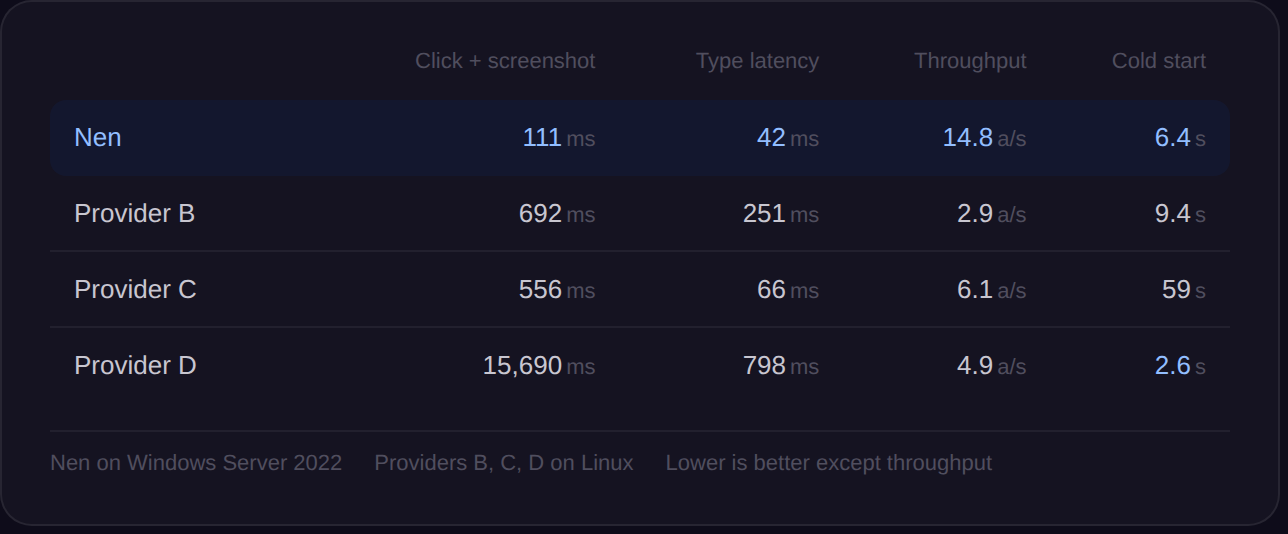
Two reasons for the gap.
(1) Nen uses RDP natively for input injection and screen capture, which captures screen changes at the driver level before they reach the framebuffer.
(2) Nen bundles a screenshot into every execute response, so one HTTP call completes a full agent step.
Provider D requires five HTTP calls for the same cycle. Every action is a shell command spawned via xdotool, and a screenshot alone requires writing a temp file, reading it back, and deleting it. Nen was built differently.
Connect your own Windows machine
Nen also supports connecting to an existing Windows machine via RDP. The developer provides connection credentials, Nen manages the session, and the same two API endpoints work identically. Agent code does not change between cloud desktops and connected machines. This matters for healthcare and insurance deployments where the system of record is on-premise and the customer will not route protected health information through a third-party cloud desktop they did not provision.
Pricing
Cloud desktop usage is $1.20 per hour. That includes the Windows Server instance, RDP-native computer use tools, and observability (screenshots and videos).
Get started
Get your API key at workspace.getnen.ai. The CLI quickstart gets you to a running agent in under five minutes.